• Home
  • Privacy policy
  • Italiano
  • English
  • Home
  • Privacy policy
  • Italiano
  • English
  • Software
    • ECT
      • ACKNOWLEDGEMENT
      • SYSTEM REQUIREMENTS
      • COMMUNICATION SCHEMES
      • DIRECTORY STRUCTURE
      • AVAILABLE TOOLS
      • INSTALLATION
      • GETTING STARTED
      • MAIN MENU
      • DEVICE EDITOR
        • ELF ORIENTED DEVICES AND NOT ELF ORIENTED DEVICES
        • STORAGE STRUCTURE OF THE DEVICE DATABASES
        • DEVICE LIST
          • CONTEXTUAL MENU IN THE DEVICE LIST
          • TOP BAR MENU
        • PAGE FOR EDITING THE VALUES IN THE DATABASE
          • TOP BAR MENU
          • MAIN - COMMUNICATION PARAMETERS AND OTHER SETTINGS
          • SCALINGS SECTION
          • INCREMENT SECTION
          • GROUPS SECTION
          • CHANNELS
          • CALIBRATION PARAMETERS
          • MEMORY MAP
        • COMMAND LINE USAGE
      • MEMORY INTERFACE
        • SEND (PC->ECU)
        • LEARN
        • RESET DIAGNOSTIC DATA
        • HDP/CRP MANAGER
        • MEMORYINTERFACE SETTINGS
      • DISPLAY
        • TYPES OF CONTAINERS
        • PROFILE STRUCTURE
        • CONTAINER MANAGEMENT
        • CONTROLS
        • MODIFICATION OF A CONTAINER
        • DATA RECORDING - F3 LOG
        • DISPLAY SETTINGS
      • CALIBRATION EDITOR
        • CALIBRATION TYPES
        • LOADING A CALIBRATION
        • WORKING WITH CALIBRATION EDITOR
        • CALIBRATION COMPARISON
        • PRINT THE VALUES OF THE CALIBRATION VARIABLES
        • SAVING CHANGES
        • DELETING A CALIBRATION FILE
        • CALIBRATION SETTINGS
      • ASAP3
      • CHARTING TOOL
        • LOADING A DATA FILE
        • MAIN MENU
        • CHANNEL LIST
        • CURSOR
        • SEGMENTS
        • DISPLAY LAYOUT
        • DISPLAY ORIENTATION
        • ZOOM
        • LINK ANALYSIS DISPLAY WITH ENGINE MAP
      • APPENDICES
        • STRING FORMAT
      • VERSION HISTORY

INCREMENT SECTION

36 views 0

PURPOSE OF INCREMENTS

They are the changing steps of calibration curve amd map values in the CalibrationEditor

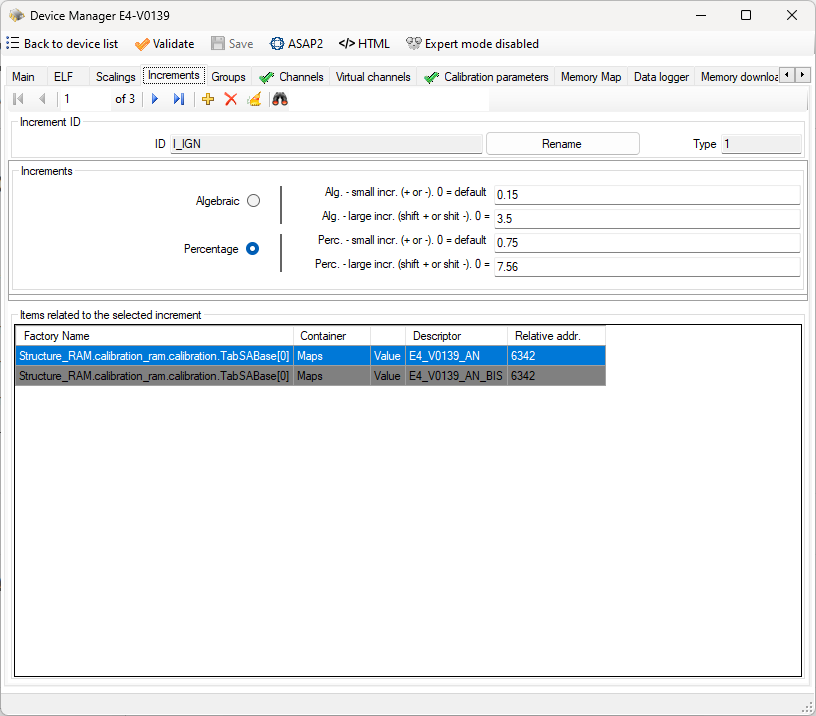
The parameters are 4 and are defined as follows:

  • Small algebraic increment (+/-)
  • Large algebraic increment (shif+/shift-)
  • Small percentage increment (+/-)
  • Large percentage increment (shift+/shift-)

COMMAND BAR

Navigation commands

These commands allow you to move through the records in the database table that contains the increments.

Add command

It lets you add a new entry to the list of increments.

You will be prompted to input a name to identify the incremnet. The name can be changed but it must not be equal to another name already used. If the name you typed is the same as an existing name, ECT alerts you with a message.

Delete command

Used to delete an entry from the list of scalings.

The command is rejected if the scaling is used in the database as attribute of a channel or calibration variable.

Delete unused items

This command checks if there are unused scalings and deletes them.

Search command

In the text area next to the binoculars, you can specify the ID of a increment to be searched.

The research starts when you press the Enter key. A further press of the Enter key allows you to search for the next occurrence. At the last event, by pressing again the Enter key, you return to the first occurrence.

The command supports wildcards

INCREMENT ID AREA

This area contains the unique increment ID display box and the ID rename command. The rename command is accepted only if the new name does not already exist.

VALUES AREA

This area contains the view and edit boxes for increment parameters. You can also set the default increment type (algebraic or percentage)

RELATED ITEMS AREA

This area contains the list of calibration curves and maps that use the selected increment.

The calibration variables belonging to different descriptors from the selected one are highlighted in gray.

If this list is empty you can use the command ‘Delete’.

Was this helpful?

Yes  No
Related Articles
  • VERSION HISTORY
  • STRING FORMAT
  • APPENDICES
  • ASAP3
  • PRINT THE VALUES OF THE CALIBRATION VARIABLES
  • LINK ANALYSIS DISPLAY WITH ENGINE MAP

Didn't find your answer? Contact Us

Previously
SCALINGS SECTION
Up Next
GROUPS SECTION
Copyright 2026 EFI Technology S.r.l. (Company subject to the management and coordination activities of MTA S.p.A.) All Rights Reserved.
We use cookies to make sure you can have the best experience on our site. If you continue to use this site we will assume that you approve our use of cookies.