GROUPS
The group membership is a parameter of channels and calibration variables. The same channel or calibration variable can be associated with more than one group.
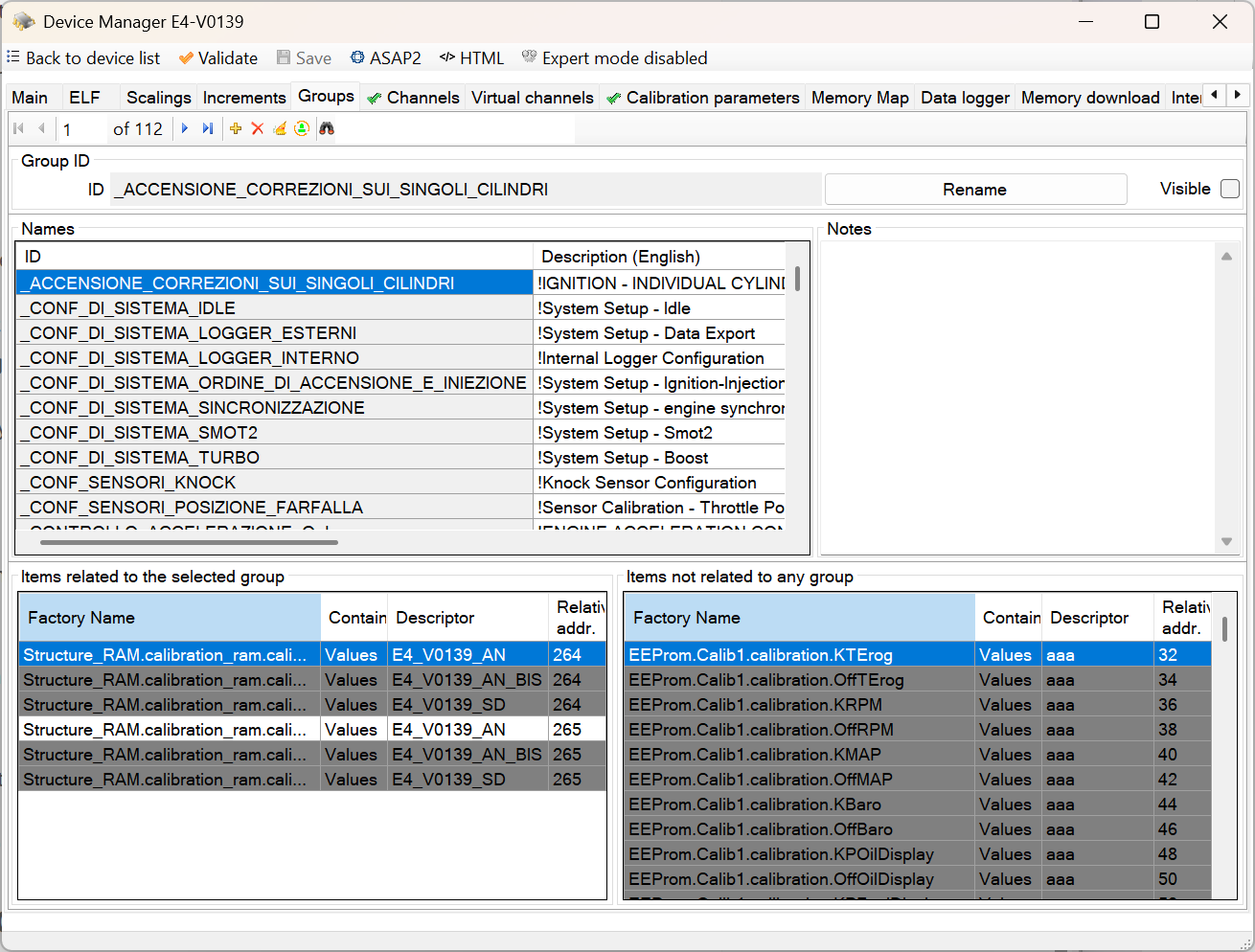
The group membership allows you to split the variables into categories and then to have a more orderly and legible display of the list of variables.
COMMAND BAR
Navigation commands
Allow you to move through the records in the database table that contains the groups.
Add command
Adds a new group.
You are prompted to specify the name of the new group. The name must not be the same as another name already used. If the name you typed is the same as an existing name, ECT alerts you with a message.
Delete command
Deletes the selected group
The command is rejected if the group is used in the database as an attribute of a channel or variable calibration.
Delete unused items
This command checks if there are unused groups and deletes them.
Disambiguate homonymous groups/subgroups with different content to allow a2l export
Subgroups are the parts of the group separated by periods.
The command checks for homonymous groups or subgroups and automatically modifies the names to ensure only unique names. This correction is necessary for exporting the database to A2L format because when exporting to A2L, individual groups and subgroups are exported as items that must have a unique ID.
For example:
The GEAR_SHIFT group could have a subgroup of GEAR_SHIFT.SETUP, but the LAMBDA group could also have a subgroup of LAMBDA.SETUP.
When exporting to a2l, four groups would be created: GEAR_SHIFT and SETUP derived from GEAR_SHIFT.SETUP, LAMBDA, and SETUP derived from LAMBDA.SETUP. However, a conflict would occur between the SETUP subgroup of GEAR_SHIFT and the SETUP subgroup of LAMBDA.
In this case, the command will automatically differentiate the names of the two subgroups to allow export to s2l.
Search command
In the text area next to the binoculars, you can specify the ID of a group to be searched.
The research starts when you press the Enter key. A further press of the Enter key allows you to search for the next occurrence. At the last event, by pressing again the Enter key, you return to the first occurrence.
The command supports wildcards
GROUP ID AREA
This area contains the display box for the unique ID of the group, the command to rename the ID and the command to set whether the group is visible for display and calibrationeditor.
The rename command is accepted only if the new name does not already exist.
In the event that there are calibration variables that the user does not need to handle, it can be useful to associate these variables to a group declared NOT visible.
TABLE AREA
This area contains the complete list of groups with unique ID and descriptions.
The description is the text that appears in the Display module and the CalibrationEditor module instead of the ID to identify a group.
Descriptions can be changed by typing text directly into the cells of the grid.
RELATED ITEMS AREA
This area contains the list of channels and calibration variables that are associated to the selected group.
The calibration variables belonging to different descriptors from the selected one are highlighted in gray.
A contextual menu allows you to connect the variable to another group.
If this list is empty you can use the command ‘Delete’.
ITEMS NOT RELATED TO ANY GROUP
This area contains the list of channels and calibration variables that do no belong to any group.
A contextual menu allows you to connect the variable to another group.