BACK TO DEVICE LIST
Lets you leave the editing page and go back to the device list.
VALIDATE
Meaningful only for devices with ELF.
Performs a validation or verification of consistency between the content of the database and the content of ELF file.
Validation can be performed if the [elf_name].ELF file exists in the ELF subfolder of folder [device_name].DEV
SAVE
Allows you to save the database after editing. The command is enabled if there are unsaved changes to the database.
ASAP2
Opens a page for exporting the database to a ASAP2 file.
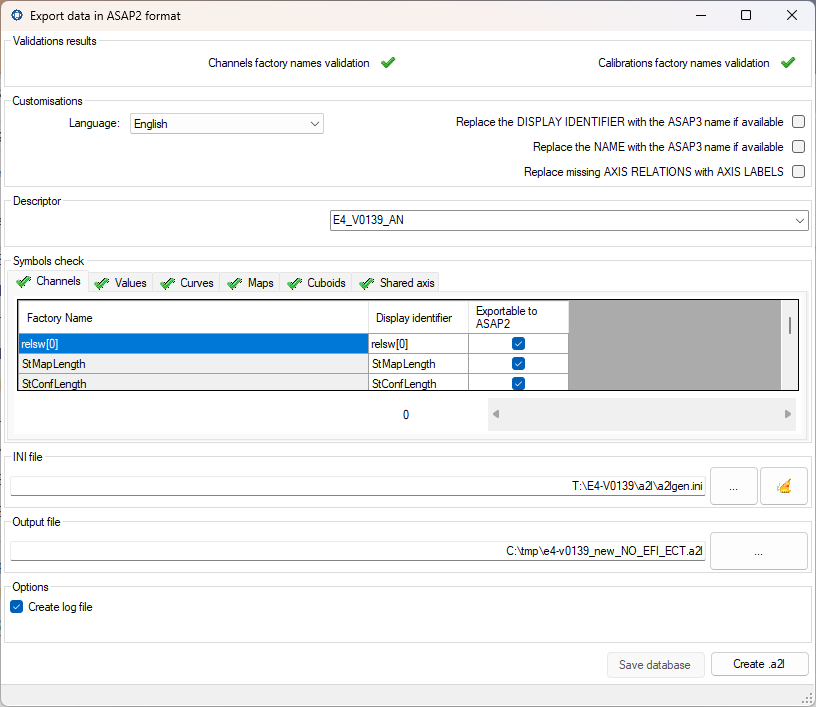
In the ASAP2 export page you can:
-
Check the current status of the validation of the factory names of channels and calibration variables.
-
Select the language for the text to be exported (if the device is configured to handle texts in multiple languages)
-
Select the descriptor to be exported. In the case that several descriptors have been defined, you can export only one.
- Replace the Display identifier with the ASAP3 name in the resulting ASAP2 file.
- Replace the Name with the ASAP3 name in the resulting ASAP2 file.
- Allows to replace the Name with the ASAP3 name in the resulting ASAP2 file.
- Replace the REFERENCE CHANNEL of an axis of a curve or map with the AXIS LABEL if the reference channel has not been assigned.
-
Check which names are not in the format allowed for export. The symbols are divided by the table and you can correct the wrong symbols.
-
Specify the INI file that defines some basic attributes of the resulting A2L file. The INI file is usually issued by EFI.
-
Specify the name of the output A2L file.
-
Save the database in the event that corrections have been made to the names to be exported.
-
Create the A2L file. The command is only active if any changes have been saved.
HTML
Opens a page for exporting the database to a HTML file.
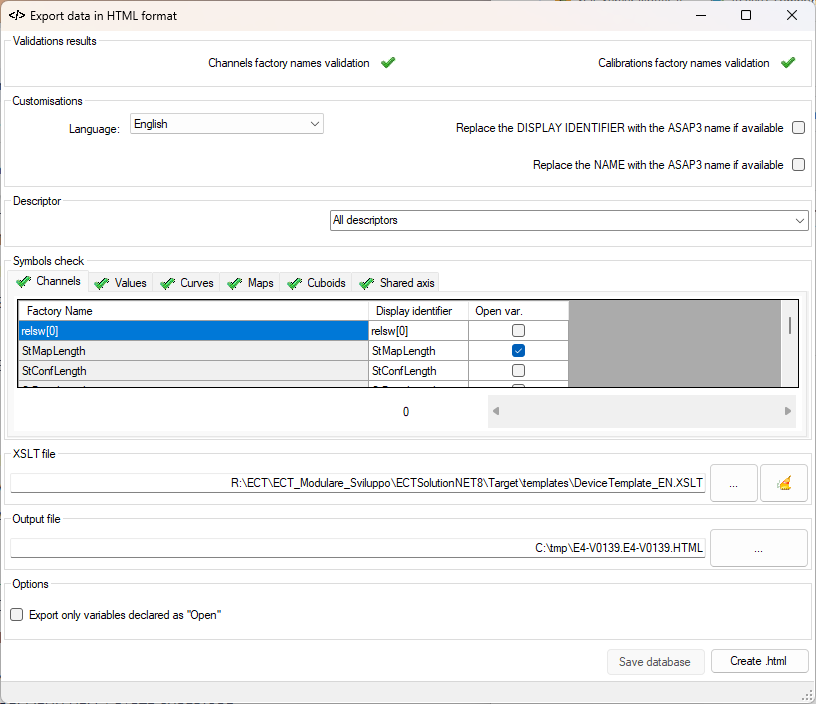
In the HTML export page you can:
-
Check the current status of the validation of the factory names of channels and calibration variables.
-
Select the language for the text to be exported (if the device is configured to handle texts in multiple languages)
-
Select the descriptor to be exported. In the case that several descriptors have been defined, you can export only one.
- Replace the Display identifier with the ASAP3 name in the resulting HTML file.
- Replace the Name with the ASAP3 name in the resulting HTML file.
- Allows to replace the Name with the ASAP3 name in the resulting HTML file.
-
Check which names are not in the format allowed for export. The symbols are divided by the table and you can correct the wrong symbols.
-
Specify the XSLT file that defines the format of the resulting HTML file. The DeviceTemplate_IT.XSLT file is released by EFI and is available in the “[ECTFOLDER]\templates” folder but you can use other custom XSLT files.
-
Specify the name of the output HTML file.
-
Save the database in the event that corrections have been made to the names to be exported.
-
Create the HTML file. The command is only active if any changes have been saved.
EXPERT MODE ENABLED/DISABLED
Enable the ability to change the most important characteristic parameters in the ‘Device Info’ section.
The parameters that are made editable are:
-
Bitrate of the application and the kernel, the ID of transmission and reception of application and kernel and parameters required for programming with the latest kernel (see ‘Communication parameters’)
-
Byte order (see byte order)
-
The main parameters related to the management of the ELF (see ELF)
-
The translation management